
Can you show another angle?
The buyer wants another angleInteractive 3D sales tools for complex export products
Hard for overseas buyers to understand?
Send one link and let them explore it themselves.
Turn fencing, machinery and other complex industrial products into interactive pages that buyers can rotate, zoom, recolor, inspect accessories and explore in exploded views—so sales teams spend less time searching for images, taking screenshots and repeating explanations.
01 Works on mobile & desktop
02 Share via website or email
03 Reuse one link
358 SECURITY FENCE · INTERACTIVE 3D
Live Case
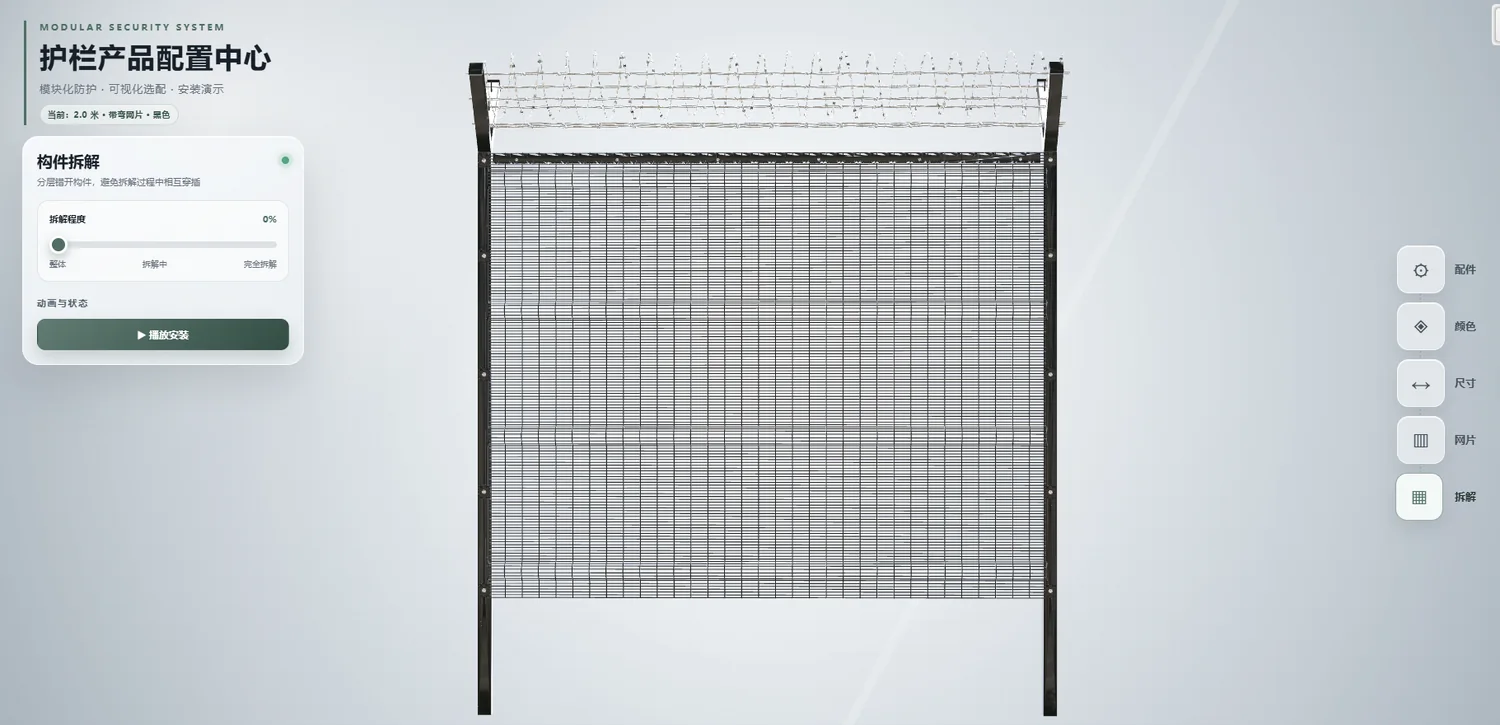 Color Options
Specification Options
Accessory Details
Exploded View
Color Options
Specification Options
Accessory Details
Exploded View
Drag to RotateScroll to ZoomClick to Switch
Explore it before reading the pitch
Use it for 30 seconds, then decide whether it is useful.
DOES THIS SOUND FAMILIAR?
Does your export team answer these questions every day?
What accessories are included?
Accessories and specifications need repeated confirmationHow is it installed?
Installation relationships are hard to explain with imagesEvery new detail question sends the salesperson back to find images, capture screenshots or send another video.An interactive link lets the buyer find the answer themselves.
FROM SHOWING TO EXPLAINING
It is not about looking flashier—it is aboutexplaining less
Keep your images and videos. Interactive 3D fills the gap they cannot: letting customers choose exactly what they want to inspect.
Traditional Materials
You decide what the customer sees
- × Images have fixed viewpoints
- × Videos follow a fixed sequence
- × Every new question means finding more files
→
Interactive 3D Link
The customer chooses what to inspect
- ✓ Rotate and zoom into details
- ✓ Switch specifications, colors and accessories
- ✓ Revisit and forward the same link
01Specifications
02Accessories
03Colors
04Exploded View
358 Security Fence Flagship Case
Instead of explaining,
let the customer explore it.
This is not a rendered image. It is an interactive product configuration page that can be sent directly to overseas buyers, ideal for explaining specification differences, component relationships, colors and optional accessories.
Lower the learning curveRely less on language and long explanations
Reduce repetitive communicationSalespeople stop searching for the same materials
Reuse across sales scenariosSend to buyers, embed on websites or present at trade shows
ONE ASSET, MANY SALES MOMENTS
Build it once,reuse it across six sales moments
What you are buying is not just “a model,” but a digital product asset that the whole sales team can reuse over time.
Email / WhatsApp
Send the link directly to overseas buyers.
Website Product Pages
Embed it in your existing website without rebuilding everything.
Desktop Presentation
Operate it live while explaining key points in sales meetings.
Mobile Viewing
Open it anytime after a mobile message or chat.
Trade Show Display
Show more products even with limited booth space.
Internal Buyer Sharing
Purchasing teams can forward it to engineers and decision-makers.
WHO NEEDS IT MOST
The more complex the product,
The more complex the product,
the more valuable this tool becomes.
If a few images already explain your product completely, you may not need this immediately. If your team repeatedly explains the points below, interactive 3D becomes much more valuable.
01Many AccessoriesOption relationships are hard to visualize
02Many SpecificationsDimension combinations are easy to confuse
03Complex Structure2D materials struggle to explain hierarchy
04Installation Is Hard to ExplainComponent relationships need to be shown
05Long Operating ProcessMachine motion needs demonstration
Fencing / Perimeter / Wire Mesh
Explain posts, mesh panels, connectors, surface finishes, dimensions and installation methods clearly.
View Fencing Case ↗Machinery / Automation Equipment
Explain machine structure, working components, motion sequences, maintenance locations and optional accessories.
View Machinery Case ↗
START WITH ONE PRODUCT
You do not need to rebuild your entire website first.Start with the one product that is hardest to explain.
Validate the value first, then decide whether to expand to more products, dedicated landing pages or a digital factory.
- 01
Send What You Have
Start with any product photos, drawings or dimensions you already have.
- 02
Confirm What to Show
Choose the specifications, colors, accessories, exploded views and motion that matter.
- 03
Build & Review
Model and develop against the agreed checklist, with staged reviews.
- 04
Approve & Launch
Receive a standalone link that can also be embedded into your website and sales workflows.
Registered Company
Scope Confirmed by Contract
50% to Start
Balance After Acceptance
Costs Agreed Upfront
FAQ
First time working together?
First time working together?
You may still have a few questions.
If your question is not listed, send us your product materials and we will first assess whether interactive 3D is a good fit.
How is this different from images and video?+
Images and videos show only what you preselect. An interactive link lets the customer choose the angle, detail or accessory to inspect. All three formats can work together—you do not need to choose only one.
Can it be embedded in our existing website?+
Yes. It can be delivered as a standalone link or embedded into an existing website. Before production, we confirm your website type and the intended placement.
Does it work on both mobile and desktop?+
Yes. It supports mobile and desktop access, with the most complete experience on desktop. Actual speed depends on model size, network conditions and device performance, so the experience is optimized for web delivery.
Do we need complete engineering drawings to start?+
No. Start by sending the photos, dimensions or drawings you already have. We will assess feasibility and list any key information still needed.
Can it be updated later?+
Small adjustments and simple data updates can be handled under the service scope. Model rebuilds, major structural changes or substantial new functionality are quoted after confirming the workload.
The next step only needs one product
Send us the product your team
finds hardest to explain.
You do not need a complete brief first. Send a product photo, webpage or drawing and we will tell you whether it is suitable, which three points are most worth showing and where to start.
Phone / WeChat: 13180297667
WECHAT CONTACT
Scan to Add WeChat
Send one product photo, webpage or drawing and we will first assess whether it is suitable for interactive 3D.